LEAP Desktop Automation
The leap-desktop binary (crate leap-app) drives the live native window
through deterministic scenarios, lossless frame capture and stability
verification. It is built for two jobs:
- Automated GUI verification — drive real workflows, assert frame-to-frame
stability (
pixels_per_point,zoom_factor,screen_rect), dump structured state JSON and capture lossless PNG screenshots for visual inspection. - Promo & demo video capture — step through a scripted tour with
--record-frames <dir>and stitch with ffmpeg (scripts/record_demo.sh).
leap-desktop flags
| Flag | Meaning |
|---|---|
--demo |
Load the built-in engineering demo dataset on startup. |
--open <PATH> |
Open a .leapw workspace, CSV, Parquet, or .leap project directory on startup. Also accepted positionally as a bare path argument. |
--script <JSON> |
Drive the live UI via a deterministic scenario JSON (see HarnessSteps below). |
--record-frames <DIR> |
Save lossless PNG frames to DIR for ffmpeg video export. |
--record-every <N> |
Capture every Nth frame when recording (default: 1). Values are clamped to ≥ 1. |
--size <W>x<H> |
Initial window size in points (default: 1440x900). Minimum inner size is 960x640. |
--enable-control-ipc |
Enable opt-in local control IPC socket ($XDG_RUNTIME_DIR/leap-<pid>.sock, mode 0600, zero TCP ports). |
--control-socket <PATH> |
Enable local control IPC at an explicit local socket path (implies --enable-control-ipc). |
-h, --help |
Print help. |
leap-desktop --demo
leap-desktop --open demo.leapw
leap-desktop --demo --size 1920x1080 --script scenario.json --record-frames frames/
A bare path argument is treated as --open. --script and --record-frames
both enable the harness; if both are given, the harness runs the scenario and
records frames while it executes. On failure, the harness exits non-zero and
closes the window with [leap-harness] FAIL: <message> on stderr.
HarnessStep JSON schema
A scenario JSON file has shape:
{
  "name": "optional scenario name",
  "steps": [ { "action": "load_demo" }, ... ]
}
Each step is an object tagged by action (snake_case). Supported actions:
action |
Extra fields | Effect |
|---|---|---|
load_demo |
— | Load the built-in engineering demo dataset. |
open_file |
path |
Open a workspace / CSV / Parquet / project directory (same dispatch as --open). |
save_workspace |
path |
Save the current state as a .leapw workspace. |
open_workspace |
path |
Open a .leapw workspace file. |
wait_frames |
count (u32) |
Wait N frames before the next step. |
switch_profile |
profile |
classic / modern (also classic_workbench, modern_docked, …) — switches workspace profile. |
set_theme |
theme |
system / light / dark / high_contrast (or hc, highcontrast). |
toggle_high_contrast |
— | Toggle high-contrast mode. |
select_rows |
rows: list of u64 |
Select the given row ids. |
clear_selection |
— | Clear the selection. |
exclude_selected |
— | Exclude the selected rows. |
clear_exclusions |
— | Clear exclusions. |
fit_ols |
x, y |
Fit OLS of y on x. |
open_launch_dialog |
platform |
Open a launch dialog. Platforms: distribution, fit_y_by_x (alias ols/ttest), fit_model (alias glm), multivariate (alias pca), contingency, graph_builder. |
open_quick_search |
— | Open the Quick Search command palette modal (Ctrl+,). |
open_shortcuts |
— | Open the profile-aware Keyboard Shortcuts reference modal (F1 / Ctrl+/). |
open_save_workspace |
— | Open the Save Workspace (.leapw) dialog (Ctrl+S). |
run_launch |
platform, y (list), x (list), by (list) |
Launch an analysis with the given y/x/by columns. Same platform aliases. |
close_dialogs |
— | Close any open dialogs. |
hide_selected |
— | Hide the selected rows. |
unhide_all |
— | Unhide all rows. |
label_selected |
— | Label the selected rows. |
run_table_script |
id |
Run a table script by id. |
trigger_report_action |
action_name |
Trigger a report action (e.g. save_residuals, save_script_to_table, export_svg, export_json, toggle_ci_pi). Note: the action field is the enum tag, so the payload field is named action_name. |
doe_make_table |
— | Materialize the DOE design table. |
tile_windows |
— | Tile the open reports. |
close_reports |
— | Close all open reports. |
open_engineering_tab |
tab |
doe / quality / reliability / timeseries (time_series, time_series_dsp) / bayes (bayesian, bayesian_inference) / plugins (plugins_extensions); none / off / close / closed closes the tab. |
set_graph_builder |
open (bool), optional x, y, color, wrap, layer, show_smoother |
Open/close the graph builder and set zone columns, faceting (wrap), layer (line / smooth / box / bar / histogram / scatter), and smoother overlay. |
add_formula |
name, formula |
Add a formula column. |
edit_cell |
row (usize), column, value |
Edit a cell. |
undo |
— | Undo. |
redo |
— | Redo. |
assert_stable |
frames (u32) |
Verify that pixels_per_point, zoom_factor and screen_rect do not drift or oscillate over the next frames consecutive frames. |
screenshot |
path |
Capture a lossless PNG of the live framebuffer to path. |
dump_state |
path |
Write a structured LiveStateSnapshot JSON file (see below). |
quit |
— | Quit the application cleanly. |
LiveStateSnapshot schema (dump_state)
{
  "frame_count": 42,
  "pixels_per_point": 2.0,
  "zoom_factor": 1.0,
  "native_pixels_per_point": 2.0,
  "screen_width": 1440.0,
  "screen_height": 900.0,
  "profile": "classic_workbench",
  "high_contrast": false,
  "ready": true,
  "dataset_name": "engineering-demo",
  "version": 3,
  "row_count": 120,
  "column_count": 6,
  "selected_count": 5,
  "excluded_count": 1,
  "hidden_count": 0,
  "labeled_count": 2,
  "report_nodes": ["OLS", "Graph"],
  "launch_open": false,
  "graph_builder_open": true,
  "is_stale": false,
  "has_ols_fit": true,
  "last_error": null,
  "open_report_count": 2,
  "table_script_count": 1
}
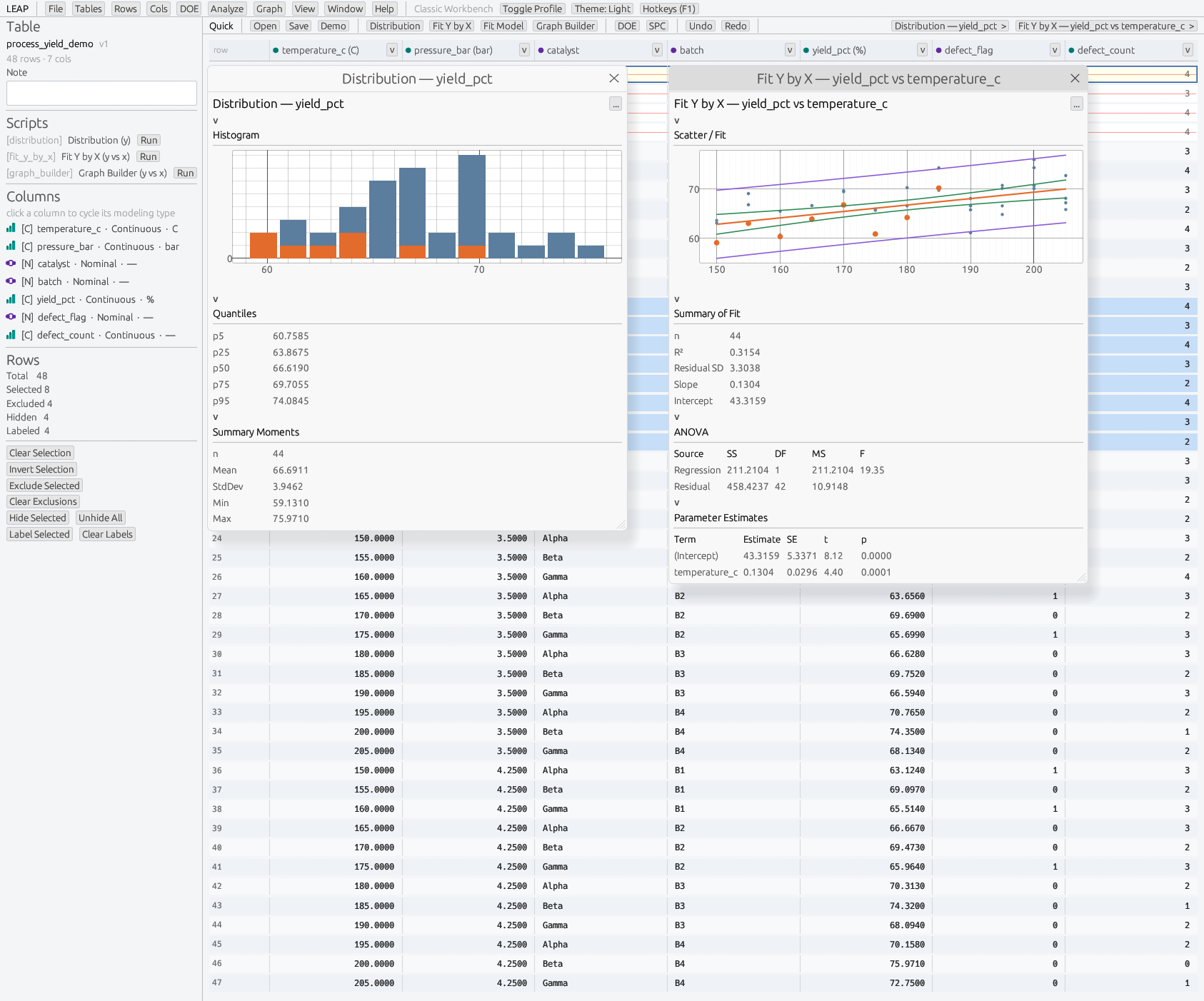
Documentation screenshots
All 25 documentation screenshots under docs/assets/screenshots/ are generated
deterministically by driving leap-desktop through the 7 JSON scenario scripts
in scripts/docs/scenarios/. Whenever the UI changes, contributors can
regenerate the entire corpus with one command:
bash scripts/docs/generate_screenshots.sh
Useful flags:
--bin <PATH>— use a specificleap-desktopbinary (defaults to buildingtarget/release/leap-desktop --offline --locked)--size <W>x<H>— viewport size in points (default1440x900)--x11— force Xwayland (WINIT_UNIX_BACKEND=x11), also auto-enabled when Wayland monitors are asleep[scenario.json ...]— regenerate only the named scenario(s), e.g.04_graph_builder.json
Every shot asserts HiDPI stability (pixels_per_point, zoom_factor, screen_rect)
and verifies non-empty lossless PNG output:
Demo video capture
For scripted promo/demo video, use scripts/record_demo.sh:
bash scripts/record_demo.sh [scenario.json] [output.mp4] [fps] [WxH]
Defaults: scripts/scenarios/promo_tour.json → target/ui-verify/leap_promo.mp4
at 15 fps, 1440x900. It builds leap-desktop --offline --locked, runs the
scenario with --record-frames <frames-dir>, then stitches frames with ffmpeg
(libx264, yuv420p, CRF 18, faststart). Requires ffmpeg on PATH.
Existing scenario fixtures live in scripts/scenarios/:
promo_tour.json— the default promo tourverify_ui.json— UI verificationverify_ui_polish.json— UI polish verificationverify_g5_and_themes.json— G5 engineering tabs × themesverify_g7_expansion.json— G7 expansion verification
Live-Application Control MCP (leap mcp)
leap-desktop supports opt-in local IPC control so an AI coding or analysis
agent can inspect and drive a running desktop instance directly over MCP
(JSON-RPC 2.0 on stdio) with zero TCP listening ports and zero HTTP
crates:
# 1. Launch LEAP with opt-in local control IPC (Unix socket mode 0600)
leap-desktop --demo --enable-control-ipc
# Or specify an explicit socket path:
leap-desktop --demo --control-socket "$XDG_RUNTIME_DIR/leap-live.sock"

# 2. Point your MCP client at the local stdio bridge:
leap mcp --socket "$XDG_RUNTIME_DIR/leap-live.sock"
# (If --socket is omitted, `leap mcp` checks $LEAP_CONTROL_SOCKET and then
# auto-discovers the most recent `leap-*.sock` in $XDG_RUNTIME_DIR.)
Exposed MCP tools (16 total):
- Inspection & data:
leap_status,leap_inspect_state,leap_load_demo,leap_open_dataset,leap_open_workspace,leap_save_workspace - Linked brushing & row states:
leap_row_states(select,select_all,clear_selection,invert_selection,exclude_selected,hide_and_exclude_selected,clear_exclusions,hide_selected,unhide_all,label_selected,clear_labels,clear_all) - Statistical reports:
leap_launch_analysis,leap_list_reports,leap_get_report_results,leap_report_action - Visualization & workbenches:
leap_configure_graph_builder,leap_open_engineering_tab,leap_set_view(profile, theme, tile/cascade, and window/chart fullscreen focus) - Image export & capture:
leap_export_plot(SVG &1x–4xPNG for any report, Graph Builder, or engineering chart),leap_screenshot(lossless viewport PNG)
Security guardrails:
- File-writing tools (
leap_save_workspace,leap_export_plot,leap_screenshot) refuse to overwrite an existing path unless the caller explicitly passes"overwrite": true. - The control socket is locked to
0600on Unix and removed cleanly on exit. - Dataset strings, column names, and notes are flagged as untrusted data in
both MCP server instructions and
leap_inspect_stateoutput.