Plugins & Extensions Workbench
LEAP's plugin system (ADR-0005) lets external tools extend analysis and reporting while staying sandboxed. Plugins run as subprocess scripts with a strict protocol; trust decisions are stored in an on-disk trust store.
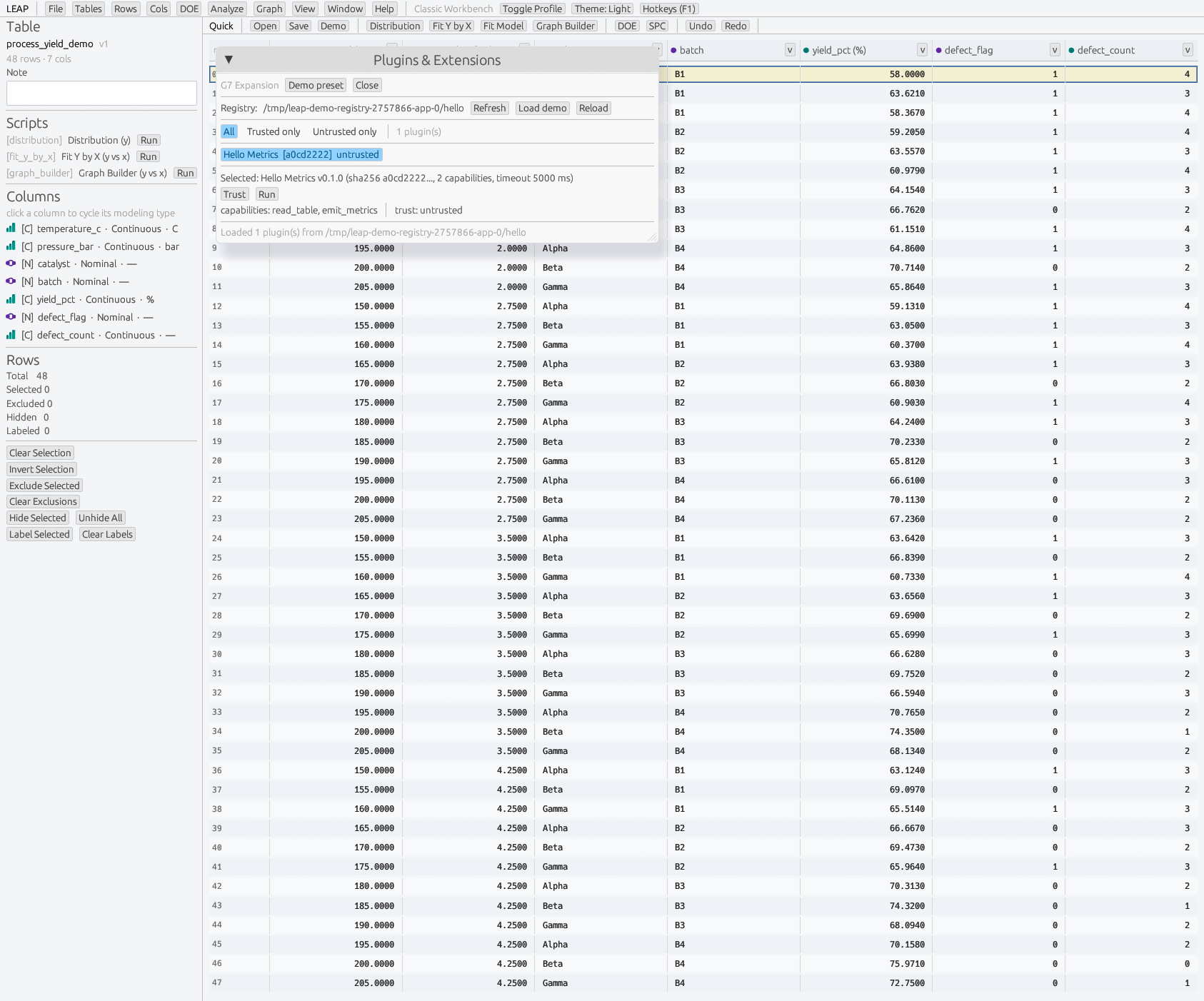
Access
- GUI: Engineering Workbenches → Plugins & Extensions —
(Ctrl+Alt+Shift+E). - CLI:
leap plugin <registry-root> <list|trust|revoke|run> ....
Registry discovery
A registry is a directory of plugin roots (or a single plugin.json). Each
plugin root carries:
plugin.jsonmanifest:id,name,version,command,args,capabilities,timeout_ms,max_output_bytes,sha256.- the command script (e.g. a script entry point).
On load the panel computes the SHA-256 of the script and compares it against the manifest hash; the trust state is looked up by (id, sha256).
Capabilities
| Capability | Label |
|---|---|
ReadTable |
read_table |
EmitTable |
emit_table |
EmitMetrics |
emit_metrics |
Trust model
Plugin trust is a two-state, per-(id, sha256) decision persisted in
trust.json:
untrusted(default) — plugin refuses to run.trusted-pinned— plugin may run; the hash is pinned. Revoke removes the trust entry (or optionally just one hash), reverting to untrusted.
trust / revoke in the panel write the store atomically; a failed save
surfaces an error message.
Running a plugin
run dispatches the plugin with the run method and an empty param object:
- the host refuses to run untrusted plugins (
plugin <id> refused: untrusted). - on success, a
RunOutcomesurfacesduration_ms,metrics_json, warnings and error strings in the UI.
Demo registry
A tiny deterministic demo plugin (hello) is created under
$TMPDIR/leap-demo-registry-<pid>-<tag>/hello/ for screenshots and
inspection; it emits metrics (e.g. {"greeting":"hello from leap","rows_seen":7}).
The demo registry is for inspection only — no third-party plugins are
installed or shipped.
Active-table integration
Plugins receive table data via leap plugin run --data <csv>. The panel's
Run button sends the empty-param request; table payloads pass through the
CLI --data flag.
GUI / CLI parity
Open Plugins & Extensions with (Ctrl+Alt+Shift+E). Refresh the registry,
select a plugin, trust or revoke it, then Run. The trust store persists in
trust.json next to the registry.
leap plugin <registry-root> list
leap plugin <registry-root> trust <plugin-id>
leap plugin <registry-root> revoke <plugin-id> [--sha256 <hash>]
leap plugin <registry-root> run <plugin-id> --params '<json>' [--data <csv>] [--svg <file>]