Keyboard Shortcuts
Both workspace profiles expose the same top-level shortcuts; the tables below are copied verbatim from SHORTCUT_REFERENCE_CLASSIC and SHORTCUT_REFERENCE_MODERN in crates/leap-app/src/workspace.rs. Chords are formatted in parentheses. Global shortcuts are suppressed while the user is editing text (except F1 / Ctrl+/ / Ctrl+,).
Classic Workbench
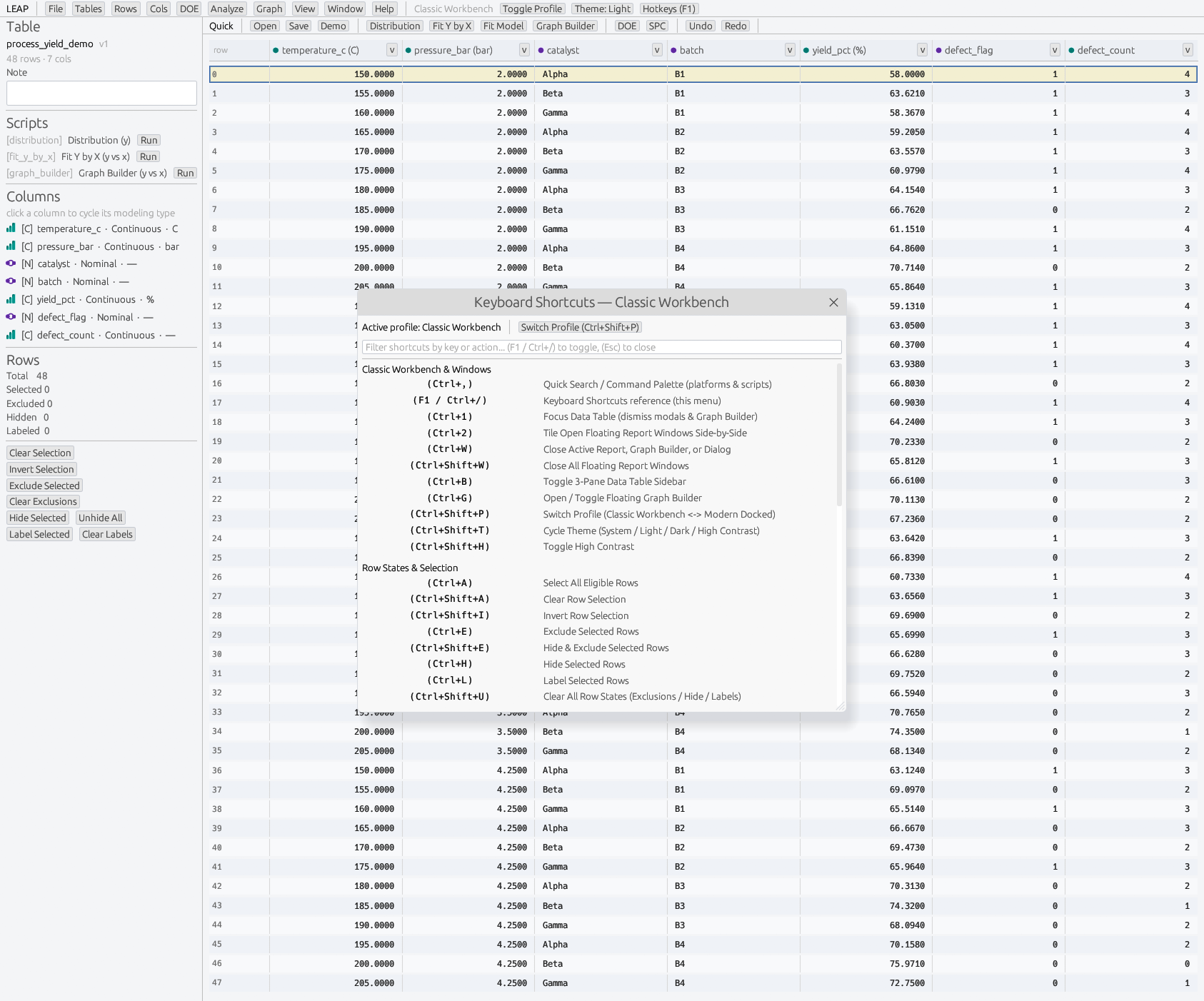
Classic Workbench & Windows
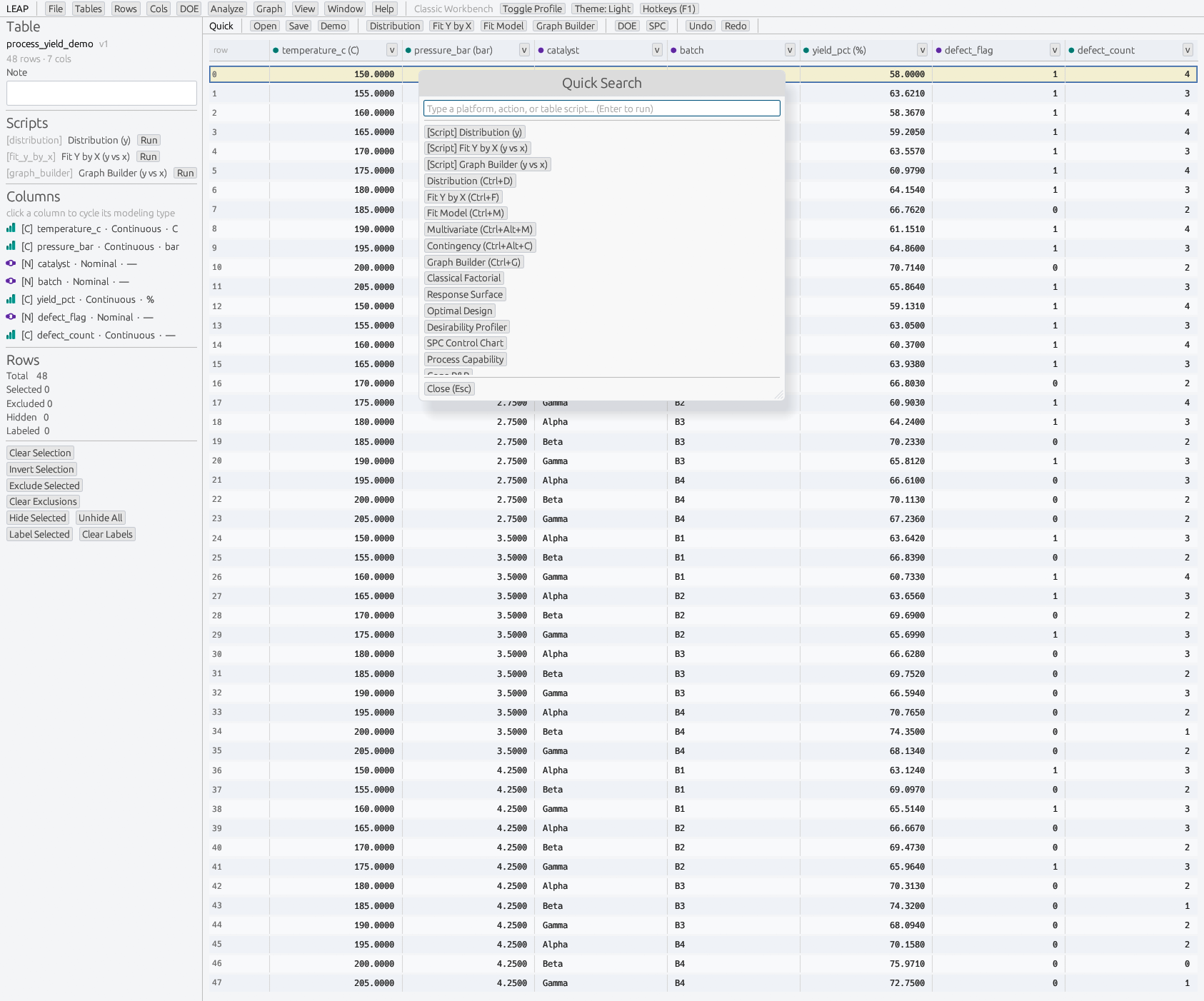
- Quick Search / Command Palette (
Ctrl+,) - Keyboard Shortcuts reference (
F1/Ctrl+/) - Focus Data Table (
Ctrl+1) — dismiss modals & Graph Builder - Tile Open Floating Report Windows Side-by-Side (
Ctrl+2) - Toggle Fullscreen Focus on Active Chart or Window (
F11/Ctrl+Shift+F;Escto restore) - Close Active Report, Graph Builder, or Dialog (
Ctrl+W) - Close All Floating Report Windows (
Ctrl+Shift+W) - Toggle 3-Pane Data Table Sidebar (
Ctrl+B) - Open / Toggle Floating Graph Builder (
Ctrl+G) - Switch Profile (Classic Workbench ↔ Modern Docked) (
Ctrl+Shift+P) - Cycle Theme (System / Light / Dark / High Contrast) (
Ctrl+Shift+T) - Toggle High Contrast (
Ctrl+Shift+H)
Row States & Selection
- Select All Eligible Rows (
Ctrl+A) - Clear Row Selection (
Ctrl+Shift+A) - Invert Row Selection (
Ctrl+Shift+I) - Exclude Selected Rows (
Ctrl+E) - Hide & Exclude Selected Rows (
Ctrl+Shift+E) - Hide Selected Rows (
Ctrl+H) - Label Selected Rows (
Ctrl+L) - Clear All Row States (Exclusions / Hide / Labels) (
Ctrl+Shift+U)
Data Table Navigation
- Move active cell cursor (Arrows / Tab / Shift+Tab)
- Jump to first / last column in row (
Ctrl+Left/Ctrl+Right) - Jump to top / bottom row in column (
Ctrl+Up/Ctrl+Down) - Jump to top-left / bottom-right table corner (
Ctrl+Home/Ctrl+End) - Jump 20 rows up / down (
PageUp/PageDown) - Extend contiguous row selection (
Shift+Up/Shift+Down) - Toggle row / Edit cell / Cancel edit or clear (
Space/Enter/Esc)
Analyses & Graphs
- Distribution (floating report) (
Ctrl+D) - Fit Y by X (floating report) (
Ctrl+F) - Fit Model (floating report) (
Ctrl+M) - Multivariate (floating report) (
Ctrl+Alt+M) - Contingency (floating report) (
Ctrl+Alt+C)
Engineering Workbenches
- DOE: Factorial / Response Surface / D-Optimal (
Ctrl+Alt+Shift+F/R/O) - Quality: SPC / Capability / Gage R&R (
Ctrl+Alt+Shift+C/K/G) - Reliability: Kaplan-Meier / Life Test / Cox-ALT (
Ctrl+Alt+Shift+M/L/X) - Advanced: Mixed Models / Time Series-DSP / Bayesian (
Ctrl+Alt+Shift+N/S/B) - Plugins & Extensions (
Ctrl+Alt+Shift+E)
File & Tables
- Open Workspace (
.leapw) / CSV / Parquet (Ctrl+O) - Save Workspace (
.leapw, relative data ref) (Ctrl+S) - Save Workspace As... (
.leapw) (Ctrl+Alt+W) - Load Demo Dataset (
Ctrl+Shift+D) - Export CSV (
Ctrl+Shift+S) - New Formula Column (
Ctrl+Alt+L) - Summary Table (
Ctrl+Alt+S) - Undo / Redo (
Ctrl+Z/Ctrl+Y/Ctrl+Shift+Z)
Modern Docked
Modern Docked Layout
- Quick Search / Command Palette (
Ctrl+,) - Keyboard Shortcuts reference (
F1/Ctrl+/) - Brush-select rows across Linked Plots & Data Grid (drag on the left Scatter)
- Clear brushed row selection (click the left Scatter)
- Focus Docked Data Grid (close dialogs) (
Ctrl+1) - Toggle Fullscreen Focus on Active Chart or Workbench (
F11/Ctrl+Shift+F;Escto restore) - Close Active Modal or Engineering Drawer (
Ctrl+W) - Switch Profile (Modern Docked ↔ Classic Workbench) (
Ctrl+Shift+P) - Cycle Theme (System / Light / Dark / High Contrast) (
Ctrl+Shift+T) - Toggle High Contrast (
Ctrl+Shift+H)
Row States & Selection (identical to Classic): Ctrl+A, Ctrl+Shift+A, Ctrl+Shift+I, Ctrl+E, Ctrl+Shift+E, Ctrl+H, Ctrl+L, Ctrl+Shift+U
Data Table Navigation (identical to Classic): Arrows / Tab / Shift+Tab, Ctrl+Left/Right, Ctrl+Up/Down, Ctrl+Home/End, PageUp/PageDown, Shift+Up/Down, Space / Enter / Esc
Analyses & Drawers
- Distribution / Fit Y by X / Fit Model dialog (
Ctrl+D/Ctrl+F/Ctrl+M) - Multivariate / Contingency dialog (
Ctrl+Alt+M/Ctrl+Alt+C) - DOE Drawer: Factorial / RSM / D-Optimal (
Ctrl+Alt+Shift+F/R/O) - Quality Drawer: SPC / Capability / Gage R&R (
Ctrl+Alt+Shift+C/K/G) - Reliability Drawer: KM / Life Test / Cox-ALT (
Ctrl+Alt+Shift+M/L/X) - Advanced Drawer: Mixed / Time Series-DSP / Bayes (
Ctrl+Alt+Shift+N/S/B)
File & Tables (identical to Classic): Ctrl+O, Ctrl+S, Ctrl+Alt+W, Ctrl+Shift+D, Ctrl+Shift+S, Ctrl+Alt+L, Ctrl+Alt+S, Ctrl+Z / Ctrl+Y / Ctrl+Shift+Z
Quick Search palette
Quick Search... (Ctrl+,) opens the command palette; every action in QUICK_SEARCH_ACTIONS is listed there, including analysis launches, engineering workbenches, row-state actions, window focus/tile/close, sidebar/toolbar toggles, profile switch, theme cycle and the shortcut reference.
Window & report actions (not in the reference tables)
- Tile Open Floating Report Windows Side-by-Side (
Ctrl+2) - Close Active Window (
Ctrl+W) - Close All Reports (
Ctrl+Shift+W) - Toggle 3-Pane Data Table Sidebar (
Ctrl+B) - Undo (
Ctrl+Z) / Redo (Ctrl+Shift+Z/Ctrl+Y)
Related pages: