Workspaces
LEAP persists two distinct things:
.leapw— a small, Git-friendly JSON single-file workspace (relative-reference)..leap/— a self-contained, crash-safe project bundle (SQLite + Parquet) with immutable snapshots.
Pick the one that matches your workflow; both round-trip through the same import/open path.
.leapw single-file workspaces
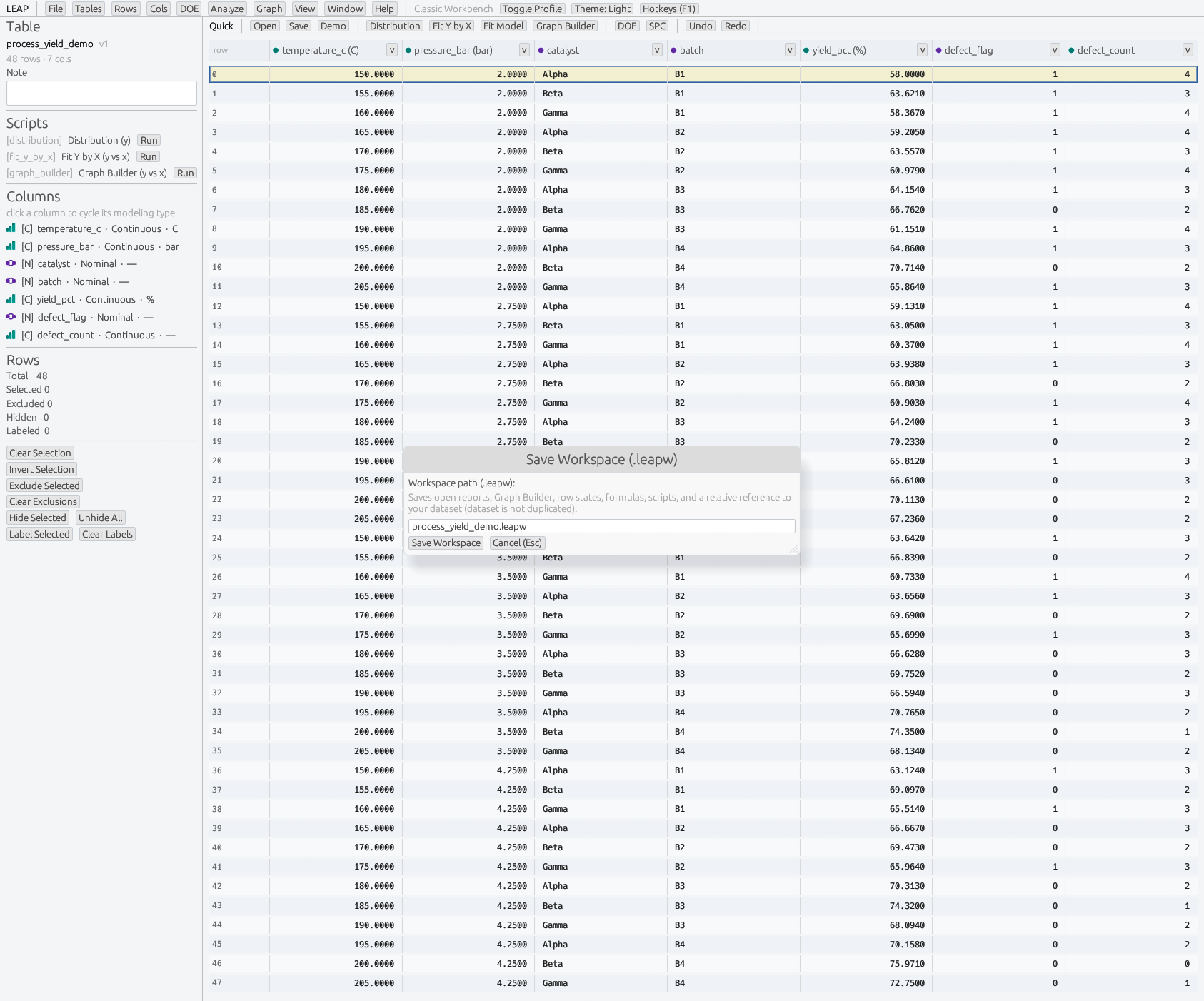
What it stores
.leapw files (extension leapw) are pretty-printed JSON documents conforming to the leap-workspace format (schema version 1). The top-level structure (from crates/leap-app/src/session.rs):
format="leap-workspace",schema_version=1dataset— aDatasetRef:kind(fileordemo), a portable relativepath(forward slashes), an absolutefallback_absolute,dataset_label, andexpected_rows/expected_columnsrecorded at save time.columns— modeling-type / unit overrides ({name, modeling_type, units})formulas— derived formula column specs ({name, expression})sort_view/filter_view— active view specs ({column, ascending}/{column, op, value})row_states— sparse{selected[], excluded[], hidden[], labeled[]}ID lists pluscolors/markerspairssidebar—{note, scripts}(TableScriptSpeclist)reports— floating report windows (platform, y/x/by, weight, freq, show_ci_pi, section_open)report_layout(defaultcascade) andfocused_report_indexgraph_builder—{open, x_col, y_col, color_col, wrap_col, layer, show_smoother}engineering— engineering workbench bindings (active_tab, quality/reliability/timeseries/bayes columns)workspace— the persistedWorkspaceConfig(profile, theme, high contrast, font scale, sidebar/toolbar visibility)modern_x_col/modern_y_col— Modern Docked linked-plot bindings
The file is written atomically (.{ext}.tmp.<pid>.<seq> sibling, fsync, rename) and validated on read (format and schema version must match).
Relative reference & moved-folder portability
The dataset is referenced by a path relative to the .leapw file (lexically computed from the parent directory). Moving the whole folder — .leapw plus its dataset — to another directory or machine preserves portability because the relative path is re-resolved at open time. If the relative target does not exist, the absolute fallback_absolute recorded at save is tried as a last resort.
Drift notice
On open, check_dataset_drift compares the recorded expected_rows / expected_columns against the loaded table; any mismatch produces a non-blocking drift notice appended to the status message ("dataset dimensions changed: expected N rows x M columns, loaded ..."). The workspace always opens; the notice is informational.
Locate Missing Dataset recovery
When the referenced dataset cannot be resolved, the import hand-off opens the Locate Referenced Dataset modal: a text field pre-filled with the primary path, a Locate button that remaps and reopens the workspace, and a Cancel button that dismisses it. Rebinding via locate_dataset updates the reference in memory and clears the modal.
leap workspace inspect
The CLI verifies a workspace file without loading the app:
leap workspace inspect <path>
It validates the JSON, the format identifier, the schema version, and the dataset object; it resolves the dataset path (relative-then-fallback), reports dataset_exists, and summarizes: report count/platforms, graph_builder.open, formula count, script count, row-state counts (selected/excluded/hidden/labeled), and the persisted profile.
.leap/ self-contained project bundles
The .leap/ project format (crates/leap-data/src/project.rs, ProjectStore) is the crash-safe, immutable-snapshot alternative:
objects/<sha256>.parquet— content-addressed Parquet snapshot objects (one per committed version)metadata.sqlite— a transactional SQLite manifest (snapshots, column metadata, named selection sets, saved analyses with spec + result JSON, current dataset version)tmp/— staging area for atomic rename
Save order is crash-safe: Parquet bytes are written to tmp/, fsynced and renamed into objects/ before the SQLite manifest transaction begins; an interrupted commit rolls back, leaving the previously committed project state intact. Orphaned staged/object files are removed on reopen (never objects referenced by a committed snapshot). A .leap project is self-contained — it does not depend on external dataset paths — and is opened through the same open_any_path handler (directory → reopen_project).
Saving & opening
Save Workspace (Ctrl+S)/Save Workspace As... (Ctrl+Alt+W)(Filemenu, Quick toolbar) — open the Save Workspace modal and write a.leapwdocument. Requires a backing CSV/Parquet on disk (demo datasets are saved with ademoreference kind instead).Open Workspace / Data... (Ctrl+O)— open a.leapwworkspace, a.leap/project directory, or a CSV/Parquet file.Load Demo Dataset (Ctrl+Shift+D)— load the built-in engineering demo dataset.
Related pages: