Data Table
The Data Table is the table-first workbench surface. Cells live in a GridData model (crates/leap-app/src/grid.rs) with a row-number gutter, per-column headers showing name and units, and per-column modeling-type glyphs.
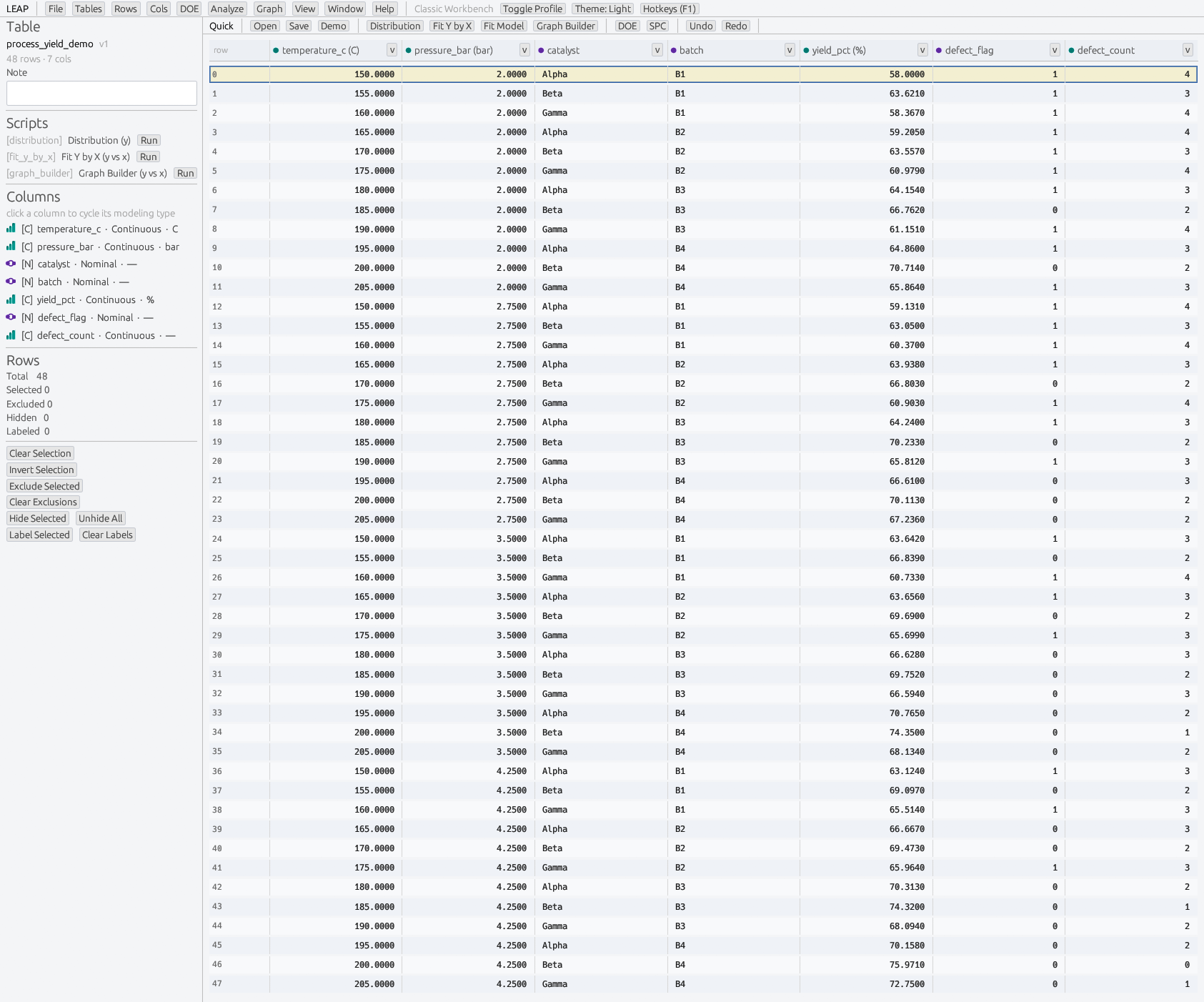
Layout and rendering
- Row-number gutter (
gutter_header_w()-wide header cell labeled "row") aligned to body rows; gutter width in the body is 78 px and shows the row index plus compact state badges for excluded / hidden / labeled rows. - Headers show column name and, when the column is at least 135 px wide, name and units (e.g.
temperature (°C)); the header is color-coded by modeling type (continuous / ordinal / nominal) with a matching glyph badge in the sidebar. - Up to 60 rows render at once (
MAX_RENDERED_ROWS_LIMIT);ROW_HEIGHTis 22 px.
Interaction
- Click a cell to focus the cursor; Enter starts an edit (or commits an in-progress edit); Escape cancels editing or clears selection.
Spacetoggles selection of the active row;Enteredits the cell;Escclears selection.- Keyboard navigation: arrows, Tab / Shift+Tab (wrap across row boundaries), Ctrl+Left/Right (first/last column), Ctrl+Up/Down (top/bottom row), Ctrl+Home / Ctrl+End (table corners), PageUp / PageDown (20-row jumps), Shift+Up / Shift+Down (extend contiguous row selection via
range_select). - Sorting and filtering: set a sort view (
set_sort_view) or filter view (set_filter_viewwithCmpOp) on numeric columns; views persist inside.leapwworkspace documents. - Cell editing: type raw values;
set_cellparses the text (numbers, nulls, text) and applies the change;commit_editreturns an error and leaves the edit in place on failure. Undo/redo is available for cell edits and operations.
Sidebar panes (Table / Columns / Rows)
The left sidebar (crates/leap-app/src/sidebar.rs) has three stacked panes:
- Table — dataset name, version, row/column counts, editable multiline table note (
NoteChangedaction), and the saved Scripts list (each row shows[kind] labelplus a Run button that emitsRunScript(<id>)). - Columns — one row per column with a modeling-type badge glyph (
[C]Continuous /[O]Ordinal /[N]Nominal), name, type and units; clicking a row cycles the modeling type (Continuous → Ordinal → Nominal → Continuous) and emitsModelingTypeCycled. - Rows — live counts (Total / Selected / Excluded / Hidden / Labeled) plus action buttons: Clear Selection, Invert Selection, Exclude Selected, Clear Exclusions, Hide Selected, Unhide All, Label Selected, Clear Labels.
Related pages: